
Your bookkeeper’s finance report, emailed on a schedule
This one came straight from a shop. Their old system emailed the bookkeeper the numbers on its own, and moving to Spekco meant someone downloading and forwarding a file instead.
Now Spekco sends it. You choose how often and when; each email covers the day, week or month that just ended, so the bookkeeper always gets complete periods and never the same one twice.
Analytics → Financial → Scheduled emails
The numbers reach your bookkeeper without anyone asking
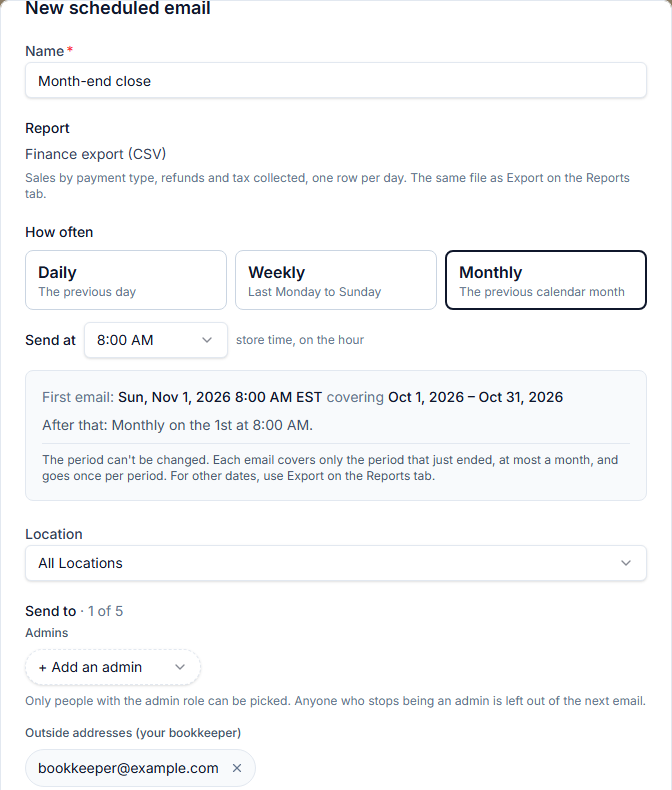
Choose how often — every day, every week or every month — and the hour it goes, in your store’s time. Each email covers the period that just ended: yesterday, last Monday to Sunday, or last month. The editor tells you exactly when the first one goes and which days it covers, before you save.
Each email carries the same finance export as the Export button on the Reports tab — one row per day, category and payment type, refunds as negative amounts — with sales, refunds and sales tax collected added up in the email itself. Choose All Locations or one store.
Send it to yourself and other admins, and to outside addresses such as your bookkeeper, up to five people a schedule. When someone adds an outside address, every admin gets an email saying who added which address. Every report has a Remove me link, so an address typed by mistake can take itself off.
Each schedule keeps a history of every email it sent and who got it. Send now emails the latest period straight away, which is a good way to see what your bookkeeper will get before the first scheduled email.
What you need to do
Nothing unless you want it. An admin sets it up under Analytics → Financial → Scheduled emails, on the Professional and Enterprise plans. The help article “Scheduled Finance Emails” walks through it.