
Warranty repairs: the manufacturer gets the bill, and your customer never sees a price
A shop that does a lot of manufacturer warranty work asked how they’d run it in Spekco. Until now, the honest answer was: as if the customer were paying. Prices on everything the customer received, an estimate for them to approve, and nowhere to bill the manufacturer.
Now a ticket can have a payer. Say who’s paying when the repair comes in, and your automatic updates still go to the customer, with no prices in them. The manufacturer gets a claim with their prices, your servicer account number and the proof of purchase. The register knows the difference too: it never takes the customer’s money for work someone else is paying for. And one page tells you what every payer owes you and what to do next.
Settings → Tickets → Warranty & insurance · Vendors → a vendor → Pays for repairs
Tell Spekco who pays you, and on what terms, once
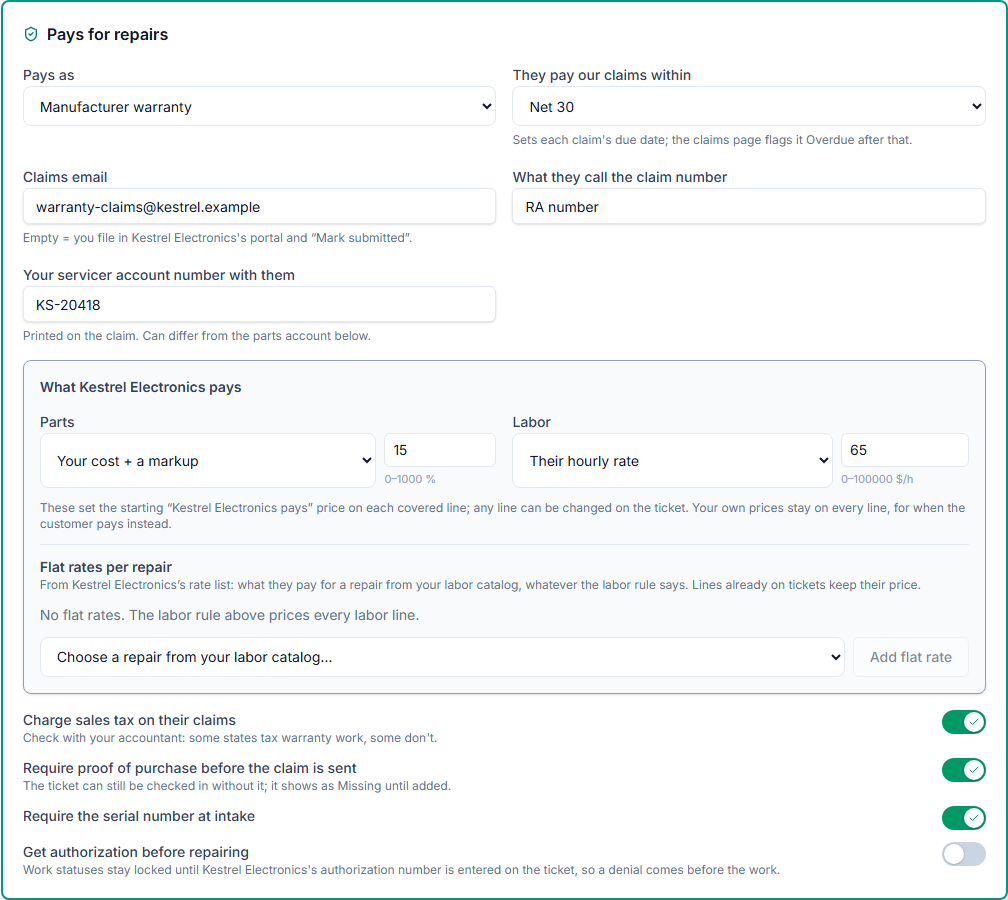
Turn on Take warranty and insurance repairs, then open the manufacturer or service plan in Vendors and turn on Pays for repairs. A vendor you already buy parts from keeps its parts details; the payer settings sit beside them.
For each payer: whether it pays as a manufacturer warranty or a service plan, the email claims go to, how many days they take to pay, what they call the claim number (an RA number, say) and your servicer account number with them. Then what they insist on: proof of purchase before the claim is sent, the serial number at intake, or their authorization before you start the repair.
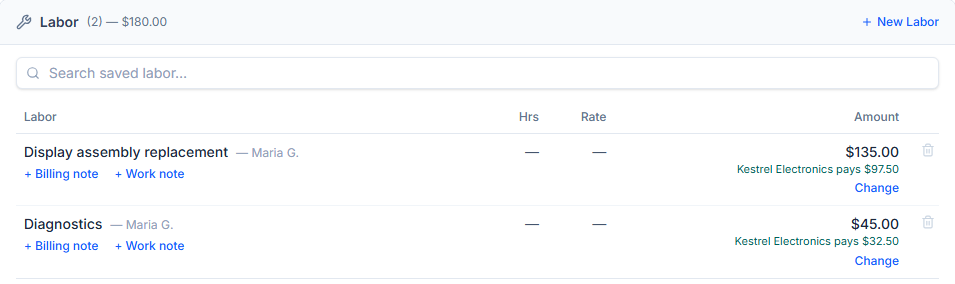
And what they pay. Parts at your price, your cost, or your cost plus a markup; labor at your labor price or their hourly rate; or a flat rate for any repair in your labor catalog, from their own rate list. Every covered line starts at that price, shown under your own, and you can change it on the ticket. Sales tax on their claims is a switch per payer, because some states tax warranty work and some don’t.
The settings page also takes the terms a customer signs when they drop off a covered repair, which print on covered tickets only, and the diagnostic fee you charge if a claim is declined and the repair is cancelled.
What you need to do
It’s off until an admin turns it on in Settings → Tickets → Warranty & insurance. Making a vendor a payer needs the Vendors permission. The help article “Warranty and Service Plan Repairs” goes through every setting.
Tickets → New Ticket → Who’s paying?
Check in a covered repair, and the customer never sees a price for it
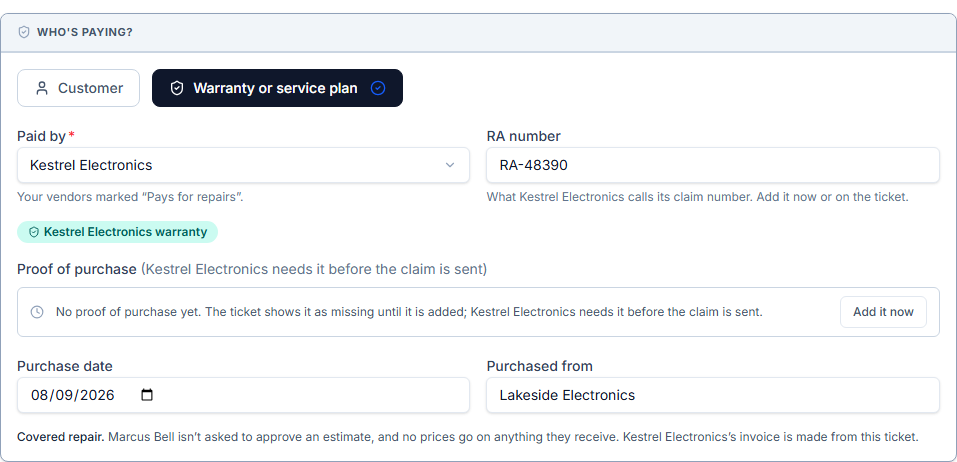
New Ticket now asks Who’s paying? Choose Warranty or service plan, pick the payer, and add what you have: the claim number, the purchase date, where it was bought, photos or a PDF of the receipt. Anything the payer requires that you don’t have yet shows as Missing on the ticket, so nobody sends a claim that will bounce back.
Every repair line on a covered ticket is billed to the payer. Fees such as a rush fee stay the customer’s.
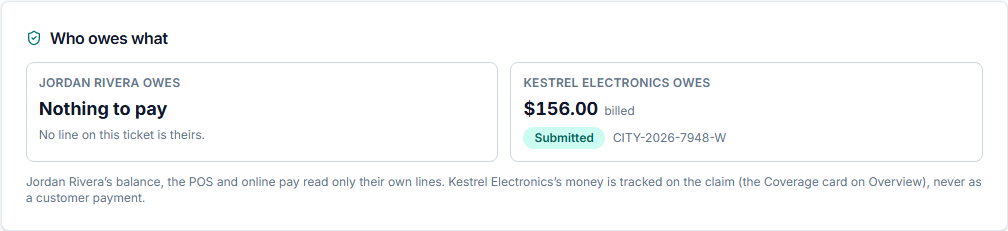
Your customer still gets every update, by email, by text and on the portal, and each one says who covers the repair. None of them shows a price for the covered work, and no estimate goes out to approve. The ticket’s Billing Details tab says who owes what: Nothing to pay for the customer, and the claim for the payer. The POS and Record payment never take the customer’s money for covered work.
Checked a repair in as the customer’s and then found it’s under warranty? Who’s paying? → Mark as covered on the ticket moves it to the payer, as long as no estimate is waiting for the customer’s answer and they haven’t paid anything yet.
What you need to do
Nothing beyond turning it on. Technicians can check in covered repairs: they see who’s paying, but not what the payer is billed unless their role can view payments.
A covered ticket → Coverage → Add proof
The receipt, straight from the customer’s phone
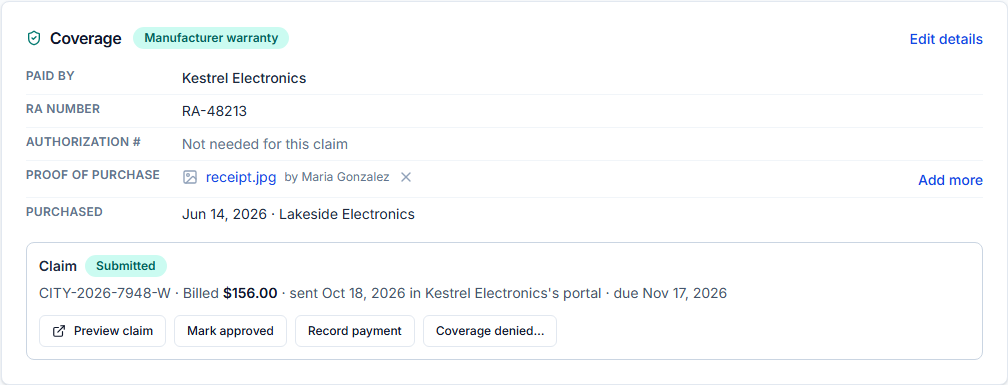
The Coverage card on the ticket keeps the proof of purchase. Add proof takes photos or a PDF of the receipt.
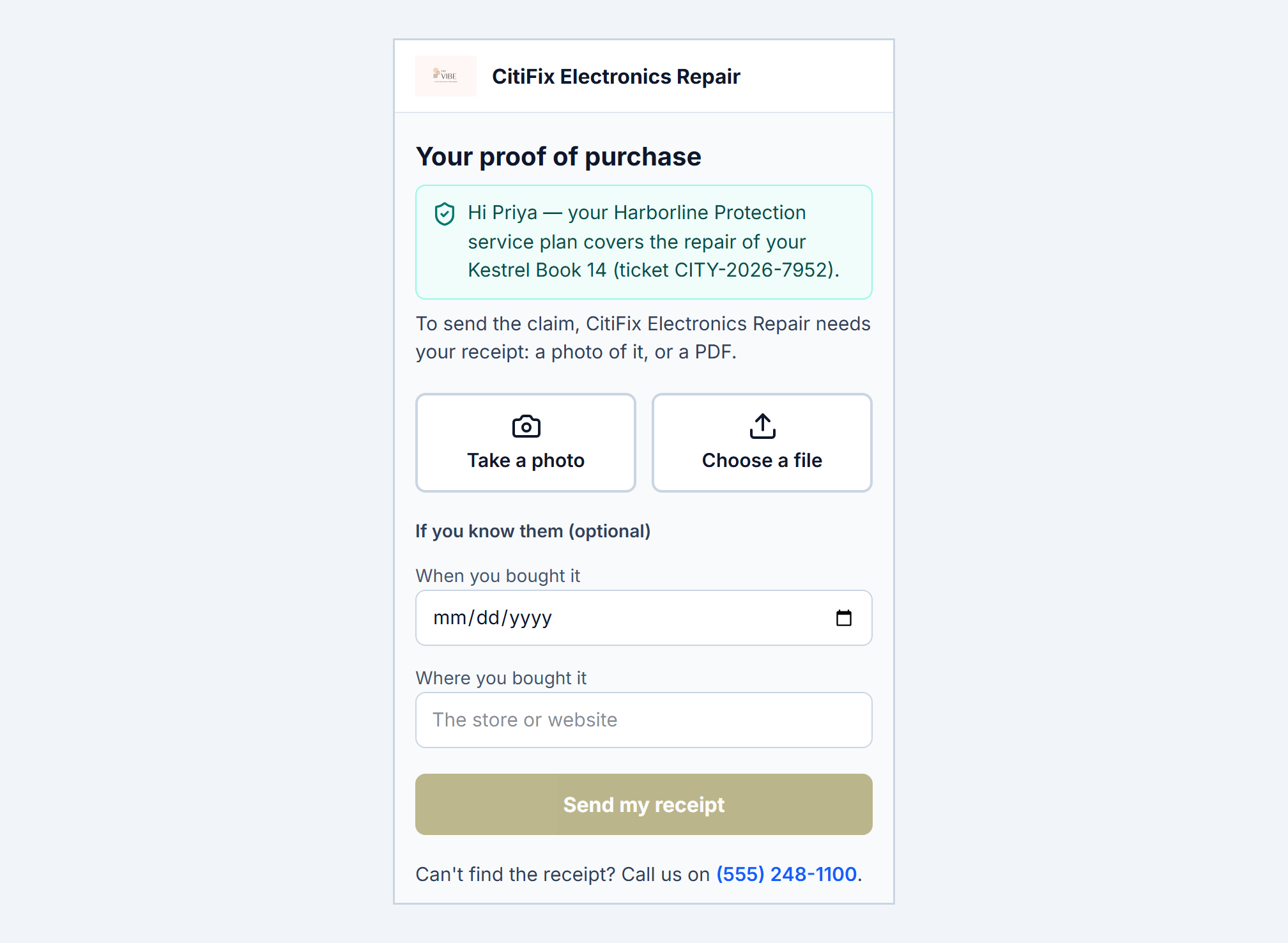
If the receipt is at home, Ask the customer to send it, in the same window, sends them a link by email and by text, wherever you can reach them. On their phone they take a photo of the receipt or choose a file, add the purchase date and store if they know them, and send it. It lands on the card marked uploaded by the customer, and fills in the date and store if you didn’t have them.
The link works for a week and for one upload, and it never shows a price. The card shows when you asked and until when the link works; Send again gives it another week, and Withdraw the link stops it.
What you need to do
Nothing. The link goes out only when someone at your shop asks for the receipt.
A covered ticket → Coverage
Send the claim, record the check, and decide what a denial means
Preview claim shows the claim exactly as the payer gets it: their prices, part numbers, your servicer account number, the work performed and the proof of purchase, never your own prices. Send to and the payer’s name emails the claim and the proof to their claims email. If you file in their portal instead, file it there and press Mark submitted with the number the portal gave you. Change a covered line after the claim went out, and the card says Changed since it was sent and offers Send the updated claim.
When their money arrives, Record payment takes the amount, the day it arrived and a reference such as the check number. Paid short? Keep the claim open for the rest, or close it and accept what they paid. Payer money is never a customer payment: it isn’t on the customer’s balance, at the POS, in refunds or in your card processor.
If they deny it, Coverage denied… asks why and what happens next, and the choices depend on whether you’ve done the repair. Before the repair: ask the customer to pay (their estimate goes out then), cancel the repair with your diagnostic fee, or fix the claim and resubmit. After it: bill the customer, write it off, or fix and resubmit.
What you need to do
Nothing. Admins can do all of it. Anyone else needs the new Warranty claims permission, in Settings → Security → Roles; your Front Desk roles that can view payments already have it.
Tickets → Warranty claims · Reports
What every payer owes you, on one page
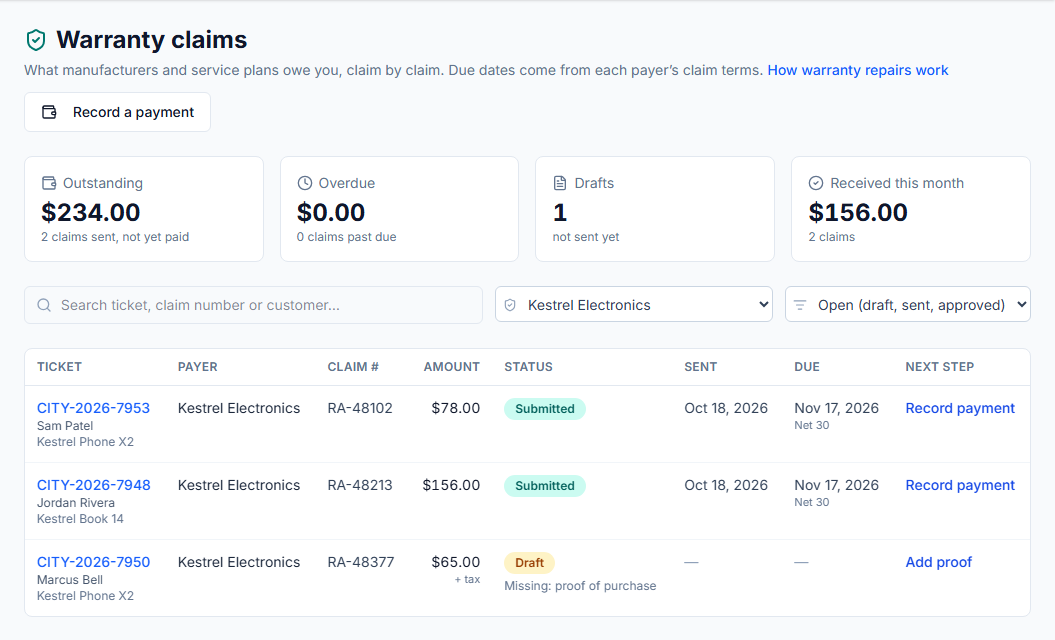
Warranty claims, in the Tickets menu, lists every claim with its next step: what’s missing, Send the claim, Send the update, or Record payment. The tiles across the top add up what payers owe you, what’s past their payment terms, the drafts you haven’t sent and what arrived this month. Filter by status or payer, or search by ticket, claim number or customer.
When one check pays a dozen claims, Record a payment, choose the payer and tick the claims it covers. Each starts at what it owes; change any that differ.
Claim money counts as repair revenue on Reports and the dashboard, on the day it arrived, and the tax in it counts as tax collected. It stays out of the customer’s lifetime spend and the register’s end of day. Reports also shows warranty claims on their own: received this month, last month and all time, and what’s still owed.
What you need to do
Nothing. The page appears in the menu once warranty repairs are on, for anyone who can view payments.