
Guide
A free repair ticket template you can print today
A repair ticket is the record of what a customer handed you, what you agreed to do, and what it will cost. This one fits on a single page, with a stub to tear off for the customer. It is free, and there is no form to fill in to get it.
Published September 28, 2026
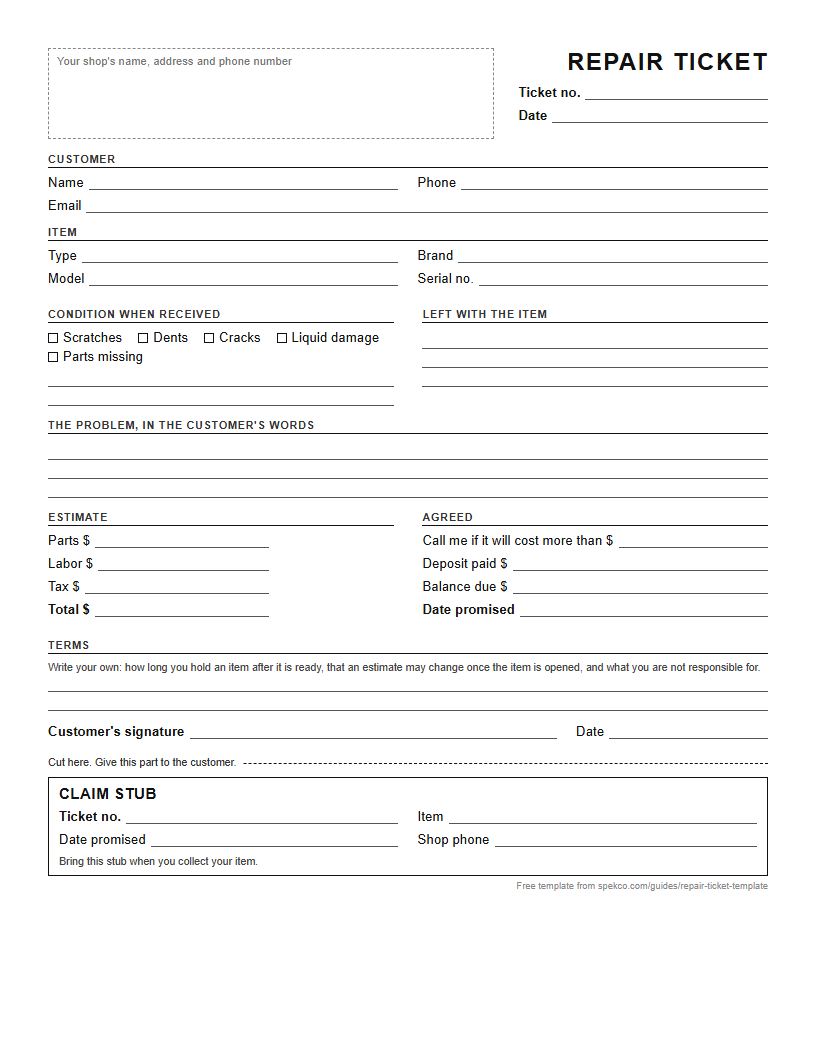
US Letter, one page. Print as many as you need.
What is on it, and why
- Ticket number and date. The number is how you find the item again; write it on a tag and tie it to the item.
- Customer name, phone and email. Two ways to reach them, because one of them will not answer.
- The item: type, brand, model and serial number. The serial number settles whose it is.
- Condition when received. Every scratch you write down now is one you cannot be blamed for later.
- What came with it: charger, case, keys, accessories. The most argued-over line on any ticket.
- The problem, in the customer's words. Your diagnosis goes on a separate line.
- The estimate, and the amount you may spend without calling. It saves a phone call on half your jobs.
- Deposit paid and balance due.
- The date promised.
- The customer's signature, under your terms: how long you hold uncollected items, and what you are not responsible for.
How to use it
- Fill it in with the customer standing at the counter, not after they leave.
- Read the condition and the accessories back to them before they sign.
- Tear off the stub and give it to them. It carries the ticket number and your phone number.
- Write the ticket number on a tag and attach it to the item.
- File the ticket by number. When they call, ask for the number on their stub.
The terms to put on yours
The template leaves room for your terms because they depend on where you trade. Most shops state how long they hold an item after it is ready before charging storage or disposing of it, that an estimate may change once the item is opened, and that they are not responsible for data or for accessories not listed. Ask someone who knows the law in your state before you rely on any of them.
When paper stops working
Paper is fine for a shop writing a few tickets a day. It stops working when customers call to ask whether their item is ready and someone has to walk to the back to find out, when the stub is lost, or when you want to know how many repairs you did last month. That is the point at which software earns its price.
Paper cannot tell anyone anything, and it cannot take a payment. Those are the two things Spekco, which is ours, is built around: ticket workflow automation and a fully integrated point of sale, in one system.
- The same ticket is filled in on screen from a template, and the customer signs on screen.
- Every status change tells the customer automatically, from drop-off to ready for pickup. Nobody types a message, and nobody phones to ask.
- The repair is paid at the register that sells your products, and the receipt is emailed.
It is $29.99 a month, with a 30-day trial and no credit card.
Questions
- Is the template really free?
- Yes. It is a PDF you download from this page. There is no form, and no email address is asked for.
- Can I put my shop's name on it?
- Yes. The top of the page is left blank for your name, address and phone number, or for a stamp.
- What should a repair ticket include?
- The customer's details, the item and its serial number, its condition when received, what came with it, the problem as the customer describes it, the estimate, the date promised and the customer's signature.